Pages

Showing posts with label cake-php. Show all posts

Sunday, July 25, 2021

Auto-generated menu : a simple idea to save time in your developpement


Most of the time, I need to do small developpement in my job and I need to do it quickly. I have to think how to improve my developpement.For example, recently, I need to add menu items quickly and when you read the code of your web site you've made few month later, it 's sometimes quite difficult. 
That's why I decided to save my menu in database. Now, menu is auto-generated.

Why do I need to save a menu in database ? 

In my work, I made a business web site with cake-php 3.9.X , Postgresql database and Bootstrap.

The goal of this tool is to display reports (generated automatically in pdf with Businness Object).Every report has a specific name.If click on an item of my menu, I need severeal paremeters in order to display the correct report like name, date, enable or disable... 

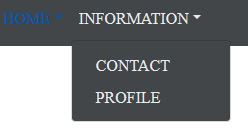
Here is an example of a  menu :

I've met a problem when I wanted  to add a submenu, I need to write to much codes :

<?php

//
$ssdomain='INFORMATION';
if($selectedSSDomain == $ssdomain) {
$ssdomainLabel = "<span class='navbar-custom'>CONTACT</span>";
} else {
$ssdomainLabel = "CONTACT";
}
echo "<form method='post' action='index.php' id='form_contact'>";
echo "<input type='hidden' name='domain' value='Information'/>";
echo "<input type='hidden' name='ssdomain' value='CONTACT'/>";
echo "<input type='hidden' name='startWithReport' value='key_1'/>";
if (isset($_POST['chooseReportDate'])) {
$tmpDate = $_POST['chooseReportDate'];
echo "<input type='hidden' name='chooseReportDate' value=\"$tmpDate\"/>";
}
if(isset($_POST['select_org']) ) {
$code = $_POST['select_org'];
echo "<input type='hidden' name='select_org' value=\"$code\"/>";
}

echo "<a class='dropdown-item' onclick=\"document.getElementById('form_contact').submit(); return false;\" >$ssdomainLabel</a>";

echo "</form>";

In my business, it happens quite often (every 6 month) and I need to remember all parameters !That's why I decided to save my menu in database. Now, it's really easy to add a new menu !


Table Menu

First, we need to add all your menu information in a table of our database as text, position, enable...

Here is the Menu table :


drop table yuzu.menu;
CREATE TABLE yuzu.menu (
                      id int primary key ,
                      id_parent int,
                      shortkey varchar(50) NOT NULL,
                      name varchar(50) NOT NULL,
                      position int,
                      grey bool
);


This table contains :
  • id : menu id
  • id_parent : To indicate that the menu is a submenu
  • shortkey : Use to identify the choosen menu
  • position : We need to order menu.
For each level of menu, we indicated the position. For example, HOME is first (position 1) then INFORMATION is second.
The submenu is also sortered with CONTACT in second position and PROFILE in the first position :


HomeController

In my controller, I retreived the Menu table and stored it in a session.    


Display auto generated menu

I wrote some code to display the menu automatically. To achieved that, I defined one method : function displayMenu($menus){}


Here is the code of two methods :

        <?php


        function getSortedMenu($menus, $currentIdParent) {
            $mainMenus = array();
            // Sort Menu
            foreach ($menus as $arr) {
                $submenus = $arr[0];
                $idParent = $submenus['id_parent'];
                if ($idParent == $currentIdParent) {
                    $position = $submenus['position'];
                    $mainMenus[$position]=$submenus;
                }
            }
            ksort($mainMenus);
            return $mainMenus;
        }


        function displayMenu($menus) {
            $mainMenus = getSortedMenu($menus, 0);
            foreach($mainMenus as $levelOnes) {

                echo "<li class=\"nav-item dropdown\">";
                $shortkey = "dropdown_".$levelOnes['shortkey'];
                echo "<a class=\"nav-link dropdown-toggle text-menu\" id='$shortkey' data-toggle=\"dropdown\" href='#'>".$levelOnes['name']."</a>";
                echo "<div class='dropdown-menu' aria-labelledby='$shortkey'>";

                foreach ($menus as $arr) {

                    $menu = $arr[0];
                    if($menu['id_parent']==$levelOnes['id']) {
                        $shortkey = "form_".$menu['shortkey'];

                        echo "<form method='post' action='/home' id='".$shortkey."'>";
                        $disabled="";
                        if ($menu['grey']) {
                            $disabled='disabled';
                        }
                        echo "<input type='hidden' name='menu_selected_id' value='".$menu['id']."'/>";
                        echo "<a class='dropdown-item $disabled text-menu' href='#'>" . $menu['name'] . "</a>";
                        echo "</form>";
                    }
                }
                echo "</div>";
                echo "</li>";
            }
        }
        ?>

This code used bootstrap and will certainly be improved.I think it's often a good way to auto-generated things. I hope it will give you some idea for your source code. 

Notes :

  • We have only two levels because I didn't need a level three of my menu.
  • The next step  is to manage authorization ! 

Versions :

CakePHP 3.9
Postgresql 9.6
Bootstrap 4.2.1

Wednesday, June 30, 2021

How to add quickly Fontawesome with cakephp

I wanted to use Fontawesome with Bootstrap in my application.I thought it was simple but not really. I needed to search a little to acchieve this tasks.Here is a little reminder.


First, you have to download Bootsrap and Fontawesome files. Here is the link for fontawesome: https://fontawesome.com/v5.15/how-to-use/on-the-web/setup/hosting-font-awesome-yourself 

Then, you need to copy files in your webroot directory.This steps was confusing to me.So, here is some pictures of my cakephp directories.

Note : I created the webfonts directory


I pasted css and js files :

  • For Bootstrap, I added bootstrap.min.css and bootstrap.min.js
  • For Fontawesome, you need to add at least all.css and fontawesome.min.css (brand.css, solid.css are optional)


Then I added Fontawesome webfonts :


Once you added the files, you need to include them in your ctp file (In my case, it's the header.ctp file).

Here is an excerpt of header.ctp :

<?= $this->Html->charset() ?>
<meta name="viewport" content="width=device-width, initial-scale=1.0">
<title>
    <?= $this->fetch('title') ?>
</title>
<?= $this->Html->meta('icon') ?>
<?= $this->Html->css('bootstrap_4.2.1.min.css') ?>
<?= $this->Html->css('bootstrap-select_1.13.9.min.css') ?>
<?= $this->Html->css('bootstrap-datepicker3_1.9.0.min.css') ?>
<?= $this->Html->css('all.css') ?>
<?= $this->Html->css('fontawesome.min.css') ?>
<?= $this->Html->css('brand.min.css') ?>
<?= $this->Html->css('solid.min.css') ?>
<?= $this->Html->script('jquery-3.4.1.slim.min.js') ?>


<!-- select date -->
<?= $this->Html->script('bootstrap-datepicker.1.9.0.min.js') ?>
<?= $this->Html->script('selectDate.js') ?>
<?= $this->Html->script('popper.1.14.6.min.js') ?>
<?= $this->Html->script('bootstrap.4.2.1.min.js') ?>
<?= $this->Html->script('bootstrap-select.1.13.9.min.js') ?>

To finish, you can use it. Here is an example of use :

        <i class="fas fa-user"></i> <!-- uses solid style -->
        <i class="far fa-user"></i> <!-- uses regular style -->
        <!--brand icon-->
        <i class="fab fa-github-square"></i>


Note : if you search the icon name, see the following link : https://fontawesome.com/v5.15/icons

Version :

  • bootstrap 4.2.1
  • fontawesome-free-5.15.1-web
  • cakephp-3.8


Monday, June 21, 2021

Change the color and size of bootstrap datepicker


To select a date, I use a datepicker. I've met a problem when I tried to cutomize it, my goal was to change the color and the size of my datepicker.
This reminder summarize the main step to do this. I test this feature with the cakephp framework but it is also possible to use without this framework.

I used the following form and jquery method to initialize my component :

<form method='post' action='home' id='form_date' >

<input type="text"  name="chooseReportDate"  class='form_datetime' onchange= "document . getElementById('form_date') . submit(); return false;" value=""/>

</form>


<script type="text/javascript">
    $(".form_datetime").datepicker({
        format: "yyyy-mm",
        language: "fr",
        weekStart: 1,
        minViewMode: 1,
    });
</script>

To change the color and add a round corner, I set the following css :

input.form_datetime {
    background-color: red;
    border-radius:5px;

To change the background of my datepicker, I need to do the following :

.datepicker.dropdown-menu table  {
    background-color: pink;
}


Version :
bootstrap-datepicker.1.9.0.min.js
bootstrap 4.2.1
cakephp-3.8

Note :
I made the following import in the header.ctp file :

<?= $this->Html->charset() ?>
<meta name="viewport" content="width=device-width, initial-scale=1.0">
<title>
    <?= $this->fetch('title') ?>
</title>
<?= $this->Html->meta('icon') ?>
<?= $this->Html->css('bootstrap_4.2.1.min.css') ?>
<?= $this->Html->css('bootstrap-select_1.13.9.min.css') ?>
<?= $this->Html->css('bootstrap-datepicker3_1.9.0.min.css') ?>
<?= $this->Html->css('all.css') ?>
<?= $this->Html->css('fontawesome.min.css') ?>
<?= $this->Html->css('brand.min.css') ?>
<?= $this->Html->css('solid.min.css') ?>
<?= $this->Html->script('jquery-3.4.1.slim.min.js') ?>
<!-- select date -->
<?= $this->Html->script('bootstrap-datepicker.1.9.0.min.js') ?>
<?= $this->Html->script('selectDate.js') ?>
<?= $this->Html->script('popper.1.14.6.min.js') ?>
<?= $this->Html->script('bootstrap.4.2.1.min.js') ?>
<?= $this->Html->script('bootstrap-select.1.13.9.min.js') ?>
<?= $this->Html->css('yuzu.css') ?>


Saturday, June 19, 2021

Feedback : Upgrade composer 1 to composer 2 successful in my cake-php project


I upgrade composer because I had some warning :

Warning from https://repo.packagist.org: Support for Composer 1 is deprecated and some packages will not be available. You should upgrade to Composer 2. See https://blog.packagist.com/deprecating-composer-1-support/

To upgrade composer, you have to execute the following command :

composer self-update --2
composer update

The upgrade was successful.
However, I noticed the following warning in my cake-php project:

Package zendframework/zend-diactoros is abandoned, you should avoid using it. Use laminas/laminas-diactoros instead.
Package asm89/twig-cache-extension is abandoned, you should avoid using it. Use twig/cache-extension instead.
Package phpunit/php-token-stream is abandoned, you should avoid using it. No replacement was suggested.
Package phpunit/phpunit-mock-objects is abandoned, you should avoid using it. No replacement was suggested.

These warnings are only warnings caused by the cake-php version. I think I need to upgrade to 3.9.x version.


version : cake-php 3.8.X

Wednesday, June 16, 2021

cake-php : create and use a configuration file


This is a reminder to use variables from a configuration file with cake-php 3.8 framework.

Configuration file

First, create yuzu_config.php in config directory :

Then add your configuration like the following :

vi yuzu_config.php
<?php
return [
'organisation' => [
    'LABO' => [
        'code' => '3',
        'label' => 'label1',
        'level' => '1'
        ]
]];

In bootstrap.php, you have to load your configuration file :

Configure::load('yuzu_config', 'default');


The last step is to use it :

use Cake\Log\Log;
use Cake\Core\Configure;

$arr = Configure::read('organisation.LABO');
$code = $arr['code'];
Log::debug($code);


Version : cake-php 3.8.x


PlayConsole : suppression des warnings lors de la publication (minify, symbole de debogage...)

Lors de la publication des versions dans la PlayConsole, j'avais 2 warnings pour indiquer qu'il était possible de réduire et d'o...