Pages

Showing posts with label postgresql. Show all posts

Sunday, July 25, 2021

Auto-generated menu : a simple idea to save time in your developpement


Most of the time, I need to do small developpement in my job and I need to do it quickly. I have to think how to improve my developpement.For example, recently, I need to add menu items quickly and when you read the code of your web site you've made few month later, it 's sometimes quite difficult. 
That's why I decided to save my menu in database. Now, menu is auto-generated.

Why do I need to save a menu in database ? 

In my work, I made a business web site with cake-php 3.9.X , Postgresql database and Bootstrap.

The goal of this tool is to display reports (generated automatically in pdf with Businness Object).Every report has a specific name.If click on an item of my menu, I need severeal paremeters in order to display the correct report like name, date, enable or disable... 

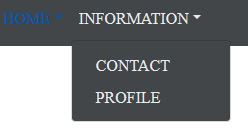
Here is an example of a  menu :
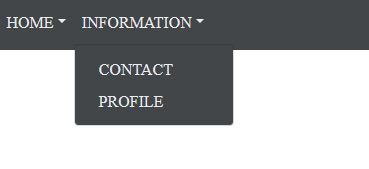
I've met a problem when I wanted  to add a submenu, I need to write to much codes :

<?php

//
$ssdomain='INFORMATION';
if($selectedSSDomain == $ssdomain) {
$ssdomainLabel = "<span class='navbar-custom'>CONTACT</span>";
} else {
$ssdomainLabel = "CONTACT";
}
echo "<form method='post' action='index.php' id='form_contact'>";
echo "<input type='hidden' name='domain' value='Information'/>";
echo "<input type='hidden' name='ssdomain' value='CONTACT'/>";
echo "<input type='hidden' name='startWithReport' value='key_1'/>";
if (isset($_POST['chooseReportDate'])) {
$tmpDate = $_POST['chooseReportDate'];
echo "<input type='hidden' name='chooseReportDate' value=\"$tmpDate\"/>";
}
if(isset($_POST['select_org']) ) {
$code = $_POST['select_org'];
echo "<input type='hidden' name='select_org' value=\"$code\"/>";
}

echo "<a class='dropdown-item' onclick=\"document.getElementById('form_contact').submit(); return false;\" >$ssdomainLabel</a>";

echo "</form>";

In my business, it happens quite often (every 6 month) and I need to remember all parameters !That's why I decided to save my menu in database. Now, it's really easy to add a new menu !


Table Menu

First, we need to add all your menu information in a table of our database as text, position, enable...

Here is the Menu table :


drop table yuzu.menu;
CREATE TABLE yuzu.menu (
                      id int primary key ,
                      id_parent int,
                      shortkey varchar(50) NOT NULL,
                      name varchar(50) NOT NULL,
                      position int,
                      grey bool
);


This table contains :
  • id : menu id
  • id_parent : To indicate that the menu is a submenu
  • shortkey : Use to identify the choosen menu
  • position : We need to order menu.
For each level of menu, we indicated the position. For example, HOME is first (position 1) then INFORMATION is second.
The submenu is also sortered with CONTACT in second position and PROFILE in the first position :


HomeController

In my controller, I retreived the Menu table and stored it in a session.    


Display auto generated menu

I wrote some code to display the menu automatically. To achieved that, I defined one method : function displayMenu($menus){}


Here is the code of two methods :

        <?php


        function getSortedMenu($menus, $currentIdParent) {
            $mainMenus = array();
            // Sort Menu
            foreach ($menus as $arr) {
                $submenus = $arr[0];
                $idParent = $submenus['id_parent'];
                if ($idParent == $currentIdParent) {
                    $position = $submenus['position'];
                    $mainMenus[$position]=$submenus;
                }
            }
            ksort($mainMenus);
            return $mainMenus;
        }


        function displayMenu($menus) {
            $mainMenus = getSortedMenu($menus, 0);
            foreach($mainMenus as $levelOnes) {

                echo "<li class=\"nav-item dropdown\">";
                $shortkey = "dropdown_".$levelOnes['shortkey'];
                echo "<a class=\"nav-link dropdown-toggle text-menu\" id='$shortkey' data-toggle=\"dropdown\" href='#'>".$levelOnes['name']."</a>";
                echo "<div class='dropdown-menu' aria-labelledby='$shortkey'>";

                foreach ($menus as $arr) {

                    $menu = $arr[0];
                    if($menu['id_parent']==$levelOnes['id']) {
                        $shortkey = "form_".$menu['shortkey'];

                        echo "<form method='post' action='/home' id='".$shortkey."'>";
                        $disabled="";
                        if ($menu['grey']) {
                            $disabled='disabled';
                        }
                        echo "<input type='hidden' name='menu_selected_id' value='".$menu['id']."'/>";
                        echo "<a class='dropdown-item $disabled text-menu' href='#'>" . $menu['name'] . "</a>";
                        echo "</form>";
                    }
                }
                echo "</div>";
                echo "</li>";
            }
        }
        ?>

This code used bootstrap and will certainly be improved.I think it's often a good way to auto-generated things. I hope it will give you some idea for your source code. 

Notes :

  • We have only two levels because I didn't need a level three of my menu.
  • The next step  is to manage authorization ! 

Versions :

CakePHP 3.9
Postgresql 9.6
Bootstrap 4.2.1

Friday, September 1, 2017

PostgresSQL administration


In my line of work and also in my personal activity (See OpenLearning Project Page), I need to administrate a Postgresql Database.I'm going to share what I need to do.In this paper, I don't explain each parameters : I only give my configuration for my purpose.If you want details about configuration, see the official website od PostgreSQL.
I encourage you to let me know you advice and what you think of my paper.Please do not hesitate to report.It's important for me and other users.

My server configuration :
  • Debian 8.0 x64 (Jessie)
  • PostgreSQL 9.4.13

Backup the database


Here is my backup script :

       
#!/bin/sh
###################################################################
# Save [DATABASE_NAME] database
#
# @author  : ...
# @version : 1.0
#
###################################################################


BACKUP_DIR=/opt/[DATABASE_NAME]/postgresql-backup
MAILTO="[MAIL]"

current_time=$(date "+%Y.%m.%d-%H.%M.%S")
backup_file="$BACKUP_DIR/[DATABASE_NAME]-dump_${current_time}.sql"

# Log script output
log()
{
    echo $1
}


##########################################################################################
# MAIN
##########################################################################################


log ""
log ""
log "#####################################################################"
log "START $0 script at $current_time"
log "#####################################################################"

log ""
log "Saving Postgresql database in ${backup_file}"

# Remarque .pgpass present dans /root/
`pg_dump --format=custom --no-owner -U postgres -v -b -f $backup_file -h 127.0.0.1 [DATABASE_NAME]`
if [ -s $backup_file ] ; then
  echo 'Dump succeeded'
  echo 'Dump succeeded'  | mail -s "[DATABASE_NAME] save database SUCCESS" $MAILTO
else
  echo 'Dump failed'
  echo 'Dump failed'  | mail -s "[DATABASE_NAME] save database FAILED" $MAILTO
fi

current_time=$(date "+%Y.%m.%d-%H.%M.%S")
log "#####################################################################"
log "END synchro script at $current_time"
log "#####################################################################"
exit 0
       

Note :
- We use postgres user to avoid permission problem.
- You have to change [DATABASE_NAME] and [MAIL] in order to use this script.
- This script ask you a password.To avoid this, see next section.

Automatic connection

Automatic connection is necessary by the backup script for crontab purpose.First of all, we need to set a password for postgres user :

       
su - postgres
psql
ALTER USER postgres WITH PASSWORD 'MY_PASSWORD';


To be sure that is work, you have to test it :

       
psql -U postgres -h 127.0.0.1 -W
       

It should ask a password and you will be able to connect at Postgresql.
Then, we create and fill a .pgpass file like the following :

       
vi /root/.pgpass
127.0.0.1:5432:[DATABASE_NAME]:postgres:[MY_PASSWORD]
       

After, make a chmod :

       
chmod 600 /root/.pgpass
       

Now, the following command should work :

       
psql -U postgres -h 127.0.0.1 -W
       

That's all ! Now a script using pg_backup should work.
To finish, we execute the backup script in crontab every night at 22:00 :

       
crontab -e
00 22 * * * /root/app/scripts/crontab/save_db.sh >> /var/app/archive/postgresql/save_db.log
       

Restore the database

Advice : the most important is to test restore of the database !

The following script ask you a password.Usually, it should not because of .pg_pass file ! It is not really important because restore isn't use in crontab script.


#!/bin/sh

###################################################################
# Restore [DATABASE_NAME] database
#
###################################################################
clear
current_time=$(date "+%Y.%m.%d-%H.%M.%S")
echo ""
echo "#####################################################################"
echo "START $0 script to RESTORE [DATABASE_NAME] DATABASE  at $current_time"
echo "#####################################################################"
echo ""


filepath=""
echo "Please enter PGSQL's backup file path ( e.g : /opt/[DATABASE_NAME]/postgresql-backup/[DATABASE_NAME]-dump_2017.08.24-10.28.35.sql) : "
read filepath
if [ "$filepath" = "" ];then
        echo "You must write a backup file path !"
        echo "END"
        exit 1
fi

if [ -e "$filepath" ];then
        echo "Restoring Postgresql database from ${filepath}..."
        pg_restore --if-exists -v -c -h 127.0.0.1 -U postgres -d [DATABASE_NAME] ${filepath}
else
        echo "File not found : $filepath"
fi

current_time=$(date "+%Y.%m.%d-%H.%M.%S")

echo "#####################################################################"
echo "END synchro script at $current_time"

echo "#####################################################################"
exit 0     
 

Note : You need to create an empty database before restoring.

Monitoring your database


To improve our application, we need to identify heavy request which have a duration upper than 50 ms.That's why we activate logging :


 vi /etc/postgresql/9.4/main/postgresql.conf
logging_collector = on
log_rotation_age = 1d
log_rotation_size = 100MB

Then we modify following parameters :

       
log_min_duration_statement = 50
log_statement = 'mod'

After, you only need restart the database :

service postgresql restart
ls /var/lib/postgresql/9.4/main/pg_log/

You will log file and you can test logging with simple request : select pg_sleep(0.5);


Source :
https://www.depesz.com/2011/05/06/understanding-postgresql-conf-log/

PlayConsole : suppression des warnings lors de la publication (minify, symbole de debogage...)

Lors de la publication des versions dans la PlayConsole, j'avais 2 warnings pour indiquer qu'il était possible de réduire et d'o...