Pages

Showing posts with label Talend. Show all posts

Saturday, October 2, 2021

Talend : call a JSON API with parameters


In my job, I need to call a JSON API every month.To achieve that, I made Talend jobs.

The first Talend job initializes parameters in context and launches a second jobs in charge of calling the API with theses parameters.


Load parameters


The first thing we need to do is to collect parameters for our JSON request. In order to use them, we stored these parameters into variables.This section will explain how we do.

Load parameters in context by using a tMap


First, we defined a variable with a key (TOKEN) and a value (row2.rnsr) by using a TMap component (MAPPING_PARAM1):


Then, the Talend  tContextLoad component (LOAD_CTX_PARAM1) will load this variable in context.


Load parameters in context by reading a file

An other useful way is to read a parameter file. I used this way to store a temporal authentication TOKEN :


In this job, we created a csv file; TOKEN.csv; that contains this line : TOKEN;123Then, we rode this variable with a tFileInputDelimited. Here is the component properties :

To finish, we made a link between  tFileInputDelimited (READ_TOKEN_FILE) and tContextLoad (LOAD_CTX) in order to load the variable in context.


Execute JSON CALL

We created a second job in order to call our JSON API (CO02_EXTRACT).

Note : 

  • In the job parameters don't forget to select "Transmit all context".
  • We used a tFlowToIterate because we have a list of parameters.
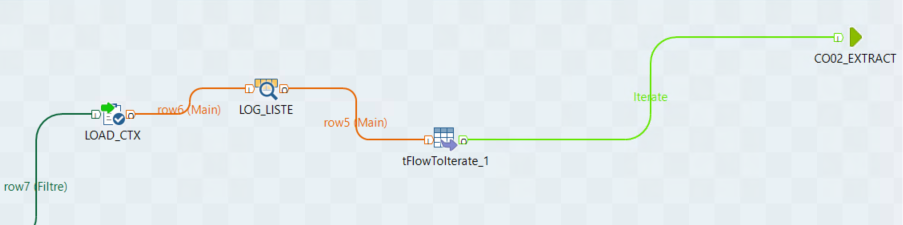


Here is the job responsible of the execution of the JSON call (CO02_EXTRACT) :
 

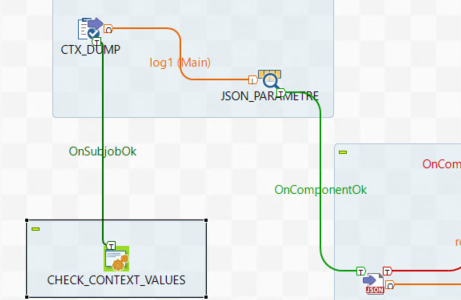
We checked theTOKEN_VALUE component in a tJAVA component (CHECK_CONTEXT_VALUE) :

String contextValue = context.TOKEN_VALUE;

context.synchronizeContext();

if (contextValue.equals("")){

System.out.println("ERROR : TOKEN doesn't exist anymore.See  TOKEN.csv");

System.exit(1);

}

Then we load all context values with a tContextDump (CTX_DUMP). 

The last step is to call the url. I used a tFileInputJSON component with URL and context parameters :


Version : Talend Open Studio Version: 7.3.1

Sunday, September 26, 2021

ERROR : value too long for the type ... character varying(255) : resolved !

This is an error very annoying with talend and in the most case, you have too wait a long times to see the error message and you don't know which column is responsible of the error. A simple way to avoid this error is to check the schema compliance with a tSchemaComplianceCheck.


It doesn't solve the problem but it permits to filter incorrect results and to know the reason of the error with the tLogRow component (REJECT_SCHEMA_COMPLIANCE) :

.---------+---------+-------+----+-----+-----+-----+----+---------+------------.

|                           REJECT_SCHEMA_COMPLIANCE                           |

|=--------+---------+-------+----+-----+-----+-----+----+---------+-----------=|

|JSON_DATE|JSON_RNSR|journal|type|orcId|idHal|idRef|code|errorCode|errorMessage|

|=--------+---------+-------+----+-----+-----+-----+----+---------+-----------=|

'---------+---------+-------+----+-----+-----+-----+----+---------+------------'


Now, in my case, I can insert in database only good results and filter bad results.

See more on  https://help.talend.com/r/en-US/7.2/validation/tschemacompliancecheck-tlogrow-tfileinputdelimited-tfileinputdelimited-setting-up-job-standard-component-enterprise-drop

PlayConsole : suppression des warnings lors de la publication (minify, symbole de debogage...)

Lors de la publication des versions dans la PlayConsole, j'avais 2 warnings pour indiquer qu'il était possible de réduire et d'o...